Weekly Content Planner Template Content Calendar Planning Guide for Creators
Creating consistent content can feel overwhelming when ideas are scattered, deadlines are approaching, and every platform requires a different strategy. A well-structured weekly content planner helps creators transform random ideas into an organized workflow that saves time, improves consistency, and makes content creation more intentional.
Whether you are a blogger, social media creator, entrepreneur, or digital marketer, having a clear content planning system allows you to focus on creating valuable posts instead of constantly wondering what to publish next. A weekly content plan gives you a simple roadmap for brainstorming ideas, creating content in batches, scheduling posts, and reviewing performance.
Key Takeaways
- A weekly content planner helps organize ideas and maintain consistency.
- Content batching reduces stress and improves productivity.
- A content calendar makes scheduling easier across multiple platforms.
- Tracking results helps creators improve future strategies.
- Planning ahead creates more purposeful and engaging content.
Why a Weekly Content Planner Is Essential for Creators
Successful content creation is rarely based on inspiration alone. While creativity is important, a reliable system helps turn ideas into consistent results. A weekly content planner provides structure by helping you decide what to create, when to publish, and how each piece of content supports your overall goals.
Without a plan, creators often spend too much time searching for ideas, changing directions, or rushing to create posts at the last minute. A simple content planning template creates a place where ideas, tasks, and deadlines can come together in one organized space.
Important: Consistency is one of the strongest foundations of successful content creation. A weekly planner does not limit creativity. Instead, it creates the structure needed for creativity to grow.
The Benefits of Planning Your Content Weekly
Weekly planning gives creators a clearer view of their content goals. Instead of creating disconnected posts, you can build a strategy where each idea has a purpose.
- Better organization: Keep content ideas, captions, visuals, and deadlines in one place.
- More consistency: Maintain a regular posting schedule without unnecessary stress.
- Improved creativity: Give yourself time to develop stronger ideas.
- Higher productivity: Complete multiple tasks through organized workflows.
How to Build an Effective Weekly Content Plan
A useful weekly content planner does not need to be complicated. The goal is to create a simple process that fits your creative style and helps you stay focused.
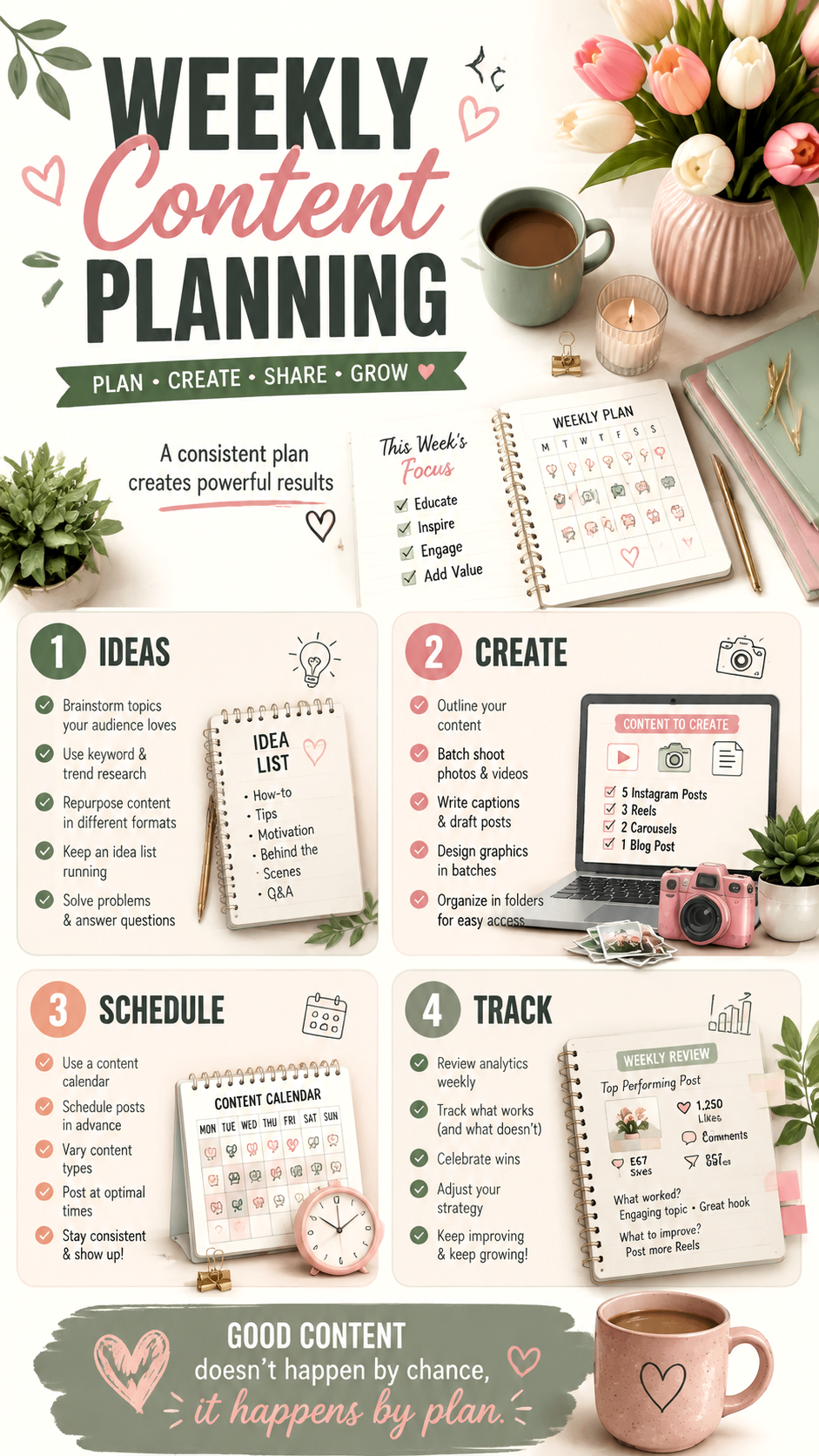
Step 1: Collect and Organize Content Ideas
Every strong content strategy starts with ideas. Instead of waiting for inspiration, create a running list of topics your audience may find helpful or interesting.
Your idea list can include:
- Educational posts and tutorials
- Behind-the-scenes content
- Frequently asked questions
- Trending topics in your niche
- Personal experiences and insights
Create an Idea Bank
An idea bank prevents creative blocks. Whenever you think of a possible topic, save it immediately. Over time, this collection becomes a valuable resource for future weekly content plans.
Step 2: Choose Your Weekly Content Themes
Content themes make planning easier because they give your week direction. Instead of creating unrelated posts, choose categories that match your goals.
For example, a creator might organize their week like this:
- Monday: Educational content
- Tuesday: Tips and recommendations
- Wednesday: Community engagement
- Thursday: Inspirational or storytelling content
- Friday: Product, service, or portfolio highlights
Step 3: Create Content in Batches
Batch creation is one of the most effective ways to save time. Instead of creating one post from start to finish every day, group similar tasks together.
You can dedicate specific time blocks for:
- Writing captions and blog ideas
- Creating graphics and visuals
- Recording videos
- Editing and organizing files
- Scheduling upcoming posts
Using a Content Calendar to Stay Consistent
A content calendar is the foundation of an organized publishing routine. It helps you see what content is planned, what needs to be created, and where each post fits within your strategy.
A simple weekly content calendar can include:
- Content title or topic
- Platform where it will be shared
- Content format such as video, image, carousel, or article
- Creation deadline
- Publishing date
- Performance notes
Planning for Multiple Platforms
Many creators publish across different platforms, including Pinterest, Instagram, blogs, newsletters, and other social channels. A planner helps adapt one idea into different formats.
For example, a single topic can become:
- A Pinterest infographic
- An Instagram carousel
- A blog article
- A short educational video
- An email newsletter
Why This Matters
A smart content workflow helps creators maximize every idea. Repurposing content allows you to reach more people while spending less time starting from scratch.
Tracking Performance and Improving Your Strategy
Planning content is only the first step. Reviewing your results helps you understand what connects with your audience and what needs improvement.
What to Track Weekly
- Most engaging posts
- Audience responses and comments
- Saves, shares, and clicks
- Content formats that perform best
- Topics that generate interest
Use your weekly review as an opportunity to learn. The goal is not perfection. The goal is understanding your audience and creating better content over time.
Simple Tips for Better Content Planning
Keep Your Planner Flexible
A content plan should guide you, not restrict you. Trends, audience needs, and new ideas may change throughout the week. Leave room for adjustments while keeping your main goals clear.
Focus on Value First
The best content solves problems, shares useful information, or creates meaningful connections. Before publishing, ask yourself how your content helps your audience.
At a Glance: Weekly Content Planning Checklist
Quick Points
- Plan ideas before creating content.
- Schedule posts to maintain consistency.
- Create content in batches to save time.
- Review results and adjust your strategy.
Conclusion: Build a Content Routine That Works
A weekly content planner is more than a simple schedule. It is a creative tool that helps turn ideas into meaningful content. With a clear plan, creators can reduce stress, stay consistent, and focus on building stronger connections with their audience.
Whether you are managing a personal brand, growing a blog, or creating social media content, a structured weekly content plan gives you the confidence to create with purpose. Start small, organize your ideas, and develop a workflow that supports your creative goals.
Tags
Weekly Content Planner
Content Calendar
Content Planning Template
Social Media Strategy
Creator Workflow
Digital Planning